
Get Started
This tutorial will teach you the basics of ContextShell.
It is not necessary to have any prior experience.
To start using ContextShell, you need:
A text editor, like Notepad, to write ContextShell config.
Quickstart
Let's create our first menu item.
Open the configuration file "shell.nss" and Write the following code and save.
Tip: You find the configuration file
shell.nss in the ContextShell program folder. To find the
program folder, use shift+right-click on the Taskbar. The ContextShell menu
will appear at the top of the context menu. In its submenu, you can click on directory to open the folder
where the configuration files are saved.
item(title='Hello, World!' cmd=msg('Hello @user.name'))
Don't worry if you don't understand the code above - we will discuss it in detail in later chapters.
Tip: ContextShell reloads its config by itself when you save any .nss file. Just right-click again.
To force a reload, hold Ctrl while you right-click.
The result will look something for this when you press the right-click in an empty place on the desktop:
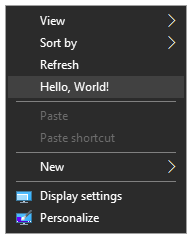
Congratulations You have now added the first time a menu item to the context menu